> ## Content Index
> Fetch the complete content index at: https://connortumbleson.com/llms.txt
> Use this file to discover other available public pages before exploring further.

# A Look into Laravel Livewire
- URL: https://connortumbleson.com/2022/05/02/a-look-into-laravel-livewire/
- Published: 2022-05-02T02:30:00.000Z
- Updated: 2025-04-02T11:14:52.000Z
- Description: Laravel Livewire touts building a dynamic interface without leaving the comfort of Laravel and I gave it a shot.
- Author: Connor Tumbleson
- Tags: Technology

![Computer cable](https://images.unsplash.com/photo-1518181835702-6eef8b4b2113?crop=entropy&cs=tinysrgb&fit=max&fm=jpg&ixid=MnwxMTc3M3wwfDF8c2VhcmNofDJ8fHdpcmV8ZW58MHx8fHwxNjUxMzE4OTM4&ixlib=rb-1.2.1&q=80&w=2000)

Photo by [Steve Johnson](https://unsplash.com/@steve%5Fj?utm%5Fsource=ghost&utm%5Fmedium=referral&utm%5Fcampaign=api-credit) / [Unsplash](https://unsplash.com/?utm%5Fsource=ghost&utm%5Fmedium=referral&utm%5Fcampaign=api-credit)

As Halo Infinite was released I knew I had to build another stat site for the game. Like most Halo stat site adventures - I had to do a different stack for the rebuild. In my memory, I had so far done:

- Halo Reach - Invision Power Board
- Halo 4 - CodeIgniter
- Halo 5 - Laravel w/ Blade
- Halo Infinite - Laravel w/ Livewire

So I started building Leaf with [Livewire](https://laravel-livewire.com/?ref=connortumbleson.com) and it was a pleasant experience that I'm still using as of this post. So I wanted to dive into all the features/functionality I used to show how I went from nothing to something extremely fast.

So the first secret with my 4th iteration of Leaf was to no longer hook the internal game's API myself. While a fun research experiment, building code to keep a constant valid session alongside a growing list of roadblocks of clearance levels and tokens was painful. When you do that - you have less time to devote to the purpose of your project which is stats. So I used [HaloDotAPI](https://autocode.com/halo/?ref=connortumbleson.com) which did just that and exposed a more friendly API for consumers.

Second, I picked a frontend framework that required no JavaScript. I did this solely out of caution that a Livewire like product might not play nice with a frontend solution that also tries to control the same aspects that Livewire would, so I settled on [Bulma](https://bulma.io/?ref=connortumbleson.com).

Finally, I pushed myself to have 100% code coverage with a good set of linters and a fully [open source project](https://github.com/iBotPeaches/LeafApp%5FInfinite?ref=connortumbleson.com) from code to pipelines for deploying and releasing.

So now that everything was ready - I dove into Livewire. I started building a simple "Add Gamertag" input box.

![](https://connortumbleson.com/content/images/2022/04/Peek-2022-04-30-12-13-1.gif)

Livewire Validation

This had a small Blade file that was very familiar to anyone writing Blade.

```html
<form wire:submit.prevent="submit" class="card-content">
    <div class="field">
        <label class="label">Gamertag</label>
        <div class="control has-icons-left @error('gamertag') has-icons-right @enderror">
            <input class="input @error('gamertag') is-danger @enderror" type="text" wire:model="gamertag"
                placeholder="Gamertag">
            <span class="icon is-small is-left">
                <i class="fab fa-xbox"></i>
            </span>
            @error('gamertag')
                <span class="icon is-small is-right">
                    <i class="fas fa-exclamation-triangle"></i>
                </span>
            @enderror
        </div>
        <p class="help is-info" wire:loading>Searching Halo Infinite for your account.</p>
        @error('gamertag')
            <p class="help is-danger">The gamertag is invalid</p>
        @enderror
    </div>

    <div class="field is-grouped">
        <div class="control">
            <button class="button is-link">Find Me</button>
        </div>
    </div>
</form>

```

You can see in here that it looks like a normal Blade file with a few different things.

- The `form` tag has `wire.submit.prevent`, which instructs Livewire to basically prevent form submission on submit and instead execute `submit` on the corresponding PHP class.
- The `input` has `wire:model="gamertag"` which binds the value entered into the `public $gamertag` value on the PHP class.
- The `<p class="help">` tag has `wire:loading` so it only appears while an in flight network request is ongoing.

So then we can look at the corresponding PHP class.

```php
class AddGamerForm extends Component
{
    public $gamertag;

    protected array $rules = [
        'gamertag' => [
            'required',
            'min:1',
            'max:32'
        ]
    ];

    public function submit(): ?Redirector
    {
        $this->validate();

        $player = Player::fromGamertag($this->gamertag);
        if ($player->exists) {
            return $this->redirectPlayer($player);
        }

        $this->validate([
            'gamertag' => [
                new ValidInfiniteAccount()
            ]
        ]);

        $player = Player::fromGamertag($this->gamertag);
        return $this->redirectPlayer($player);
    }

    public function render(): View
    {
        return view('livewire.add-gamer-form');
    }

    private function redirectPlayer(Player $player): Redirector
    {
        return redirect()->route('player', [$player]);
    }
}
```

You can see above the following in this PHP class.

- We leverage the "[rules](https://laravel-livewire.com/docs/2.x/input-validation?ref=connortumbleson.com)" functionality of Livewire to validate input.
- If it validates, we first check if we know this gamertag otherwise falling back to looking them up.
- We instruct Livewire which file to render.

I then have a fully interactive search box with validation and more without writing a single line of JavaScript.

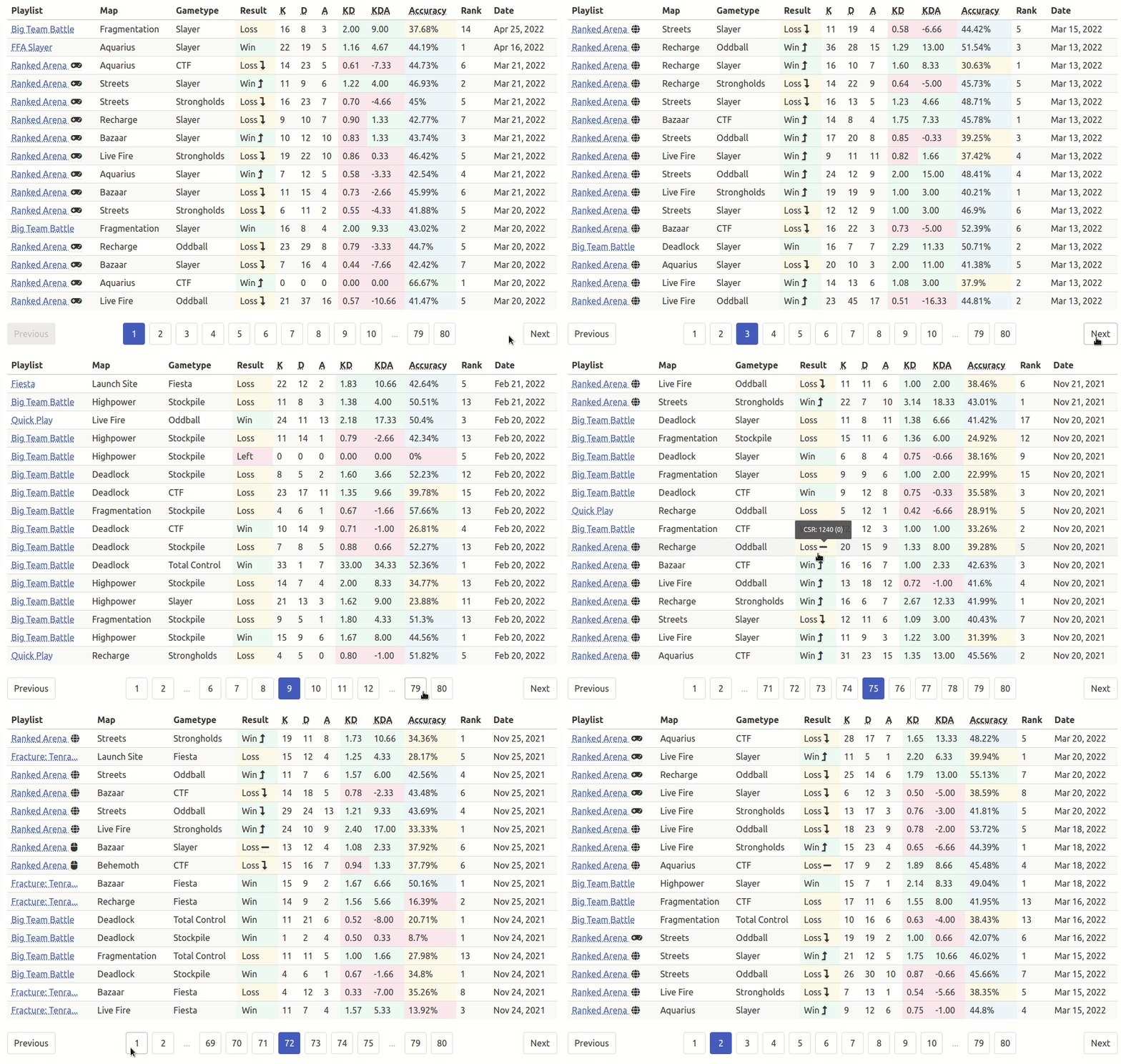
Now I wanted to start figuring out how to paginate without full page refreshes. Livewire once again had a [section dedicated](https://laravel-livewire.com/docs/2.x/pagination?ref=connortumbleson.com) to pagination which made this as easy as plain Laravel.
![](https://connortumbleson.com/content/images/2022/04/Peek-2022-04-30-12-18.gif)

Livewire Pagination

Moving between pages felt slick and fast and it seemed like I could even excel it further with cursor based pagination, but the URL with cursor based pagination didn't look as friendly as say `/page/17` of game history.

This made the component PHP wise for Livewire very small and easy to understand.

```php
class GameHistoryTable extends Component
{
    use WithPagination;

    public Player $player;

    public function paginationView(): string
    {
        return 'pagination::bulma';
    }

    public function render(): View
    {
        return view('livewire.game-history-table', [
            'games' => $this->player
                ->games()
                ->with(['playlist', 'map', 'category'])
                ->orderByDesc('occurred_at')
                ->paginate(16)
        ]);
    }
}
```

All I needed to add was a trait - `WithPagination` and optionally I added a `paginationView` function so I could overload which pagination interface was drawn. I needed to do this to build a Bulma compatible pagination since it wasn't a supported default in Laravel. 

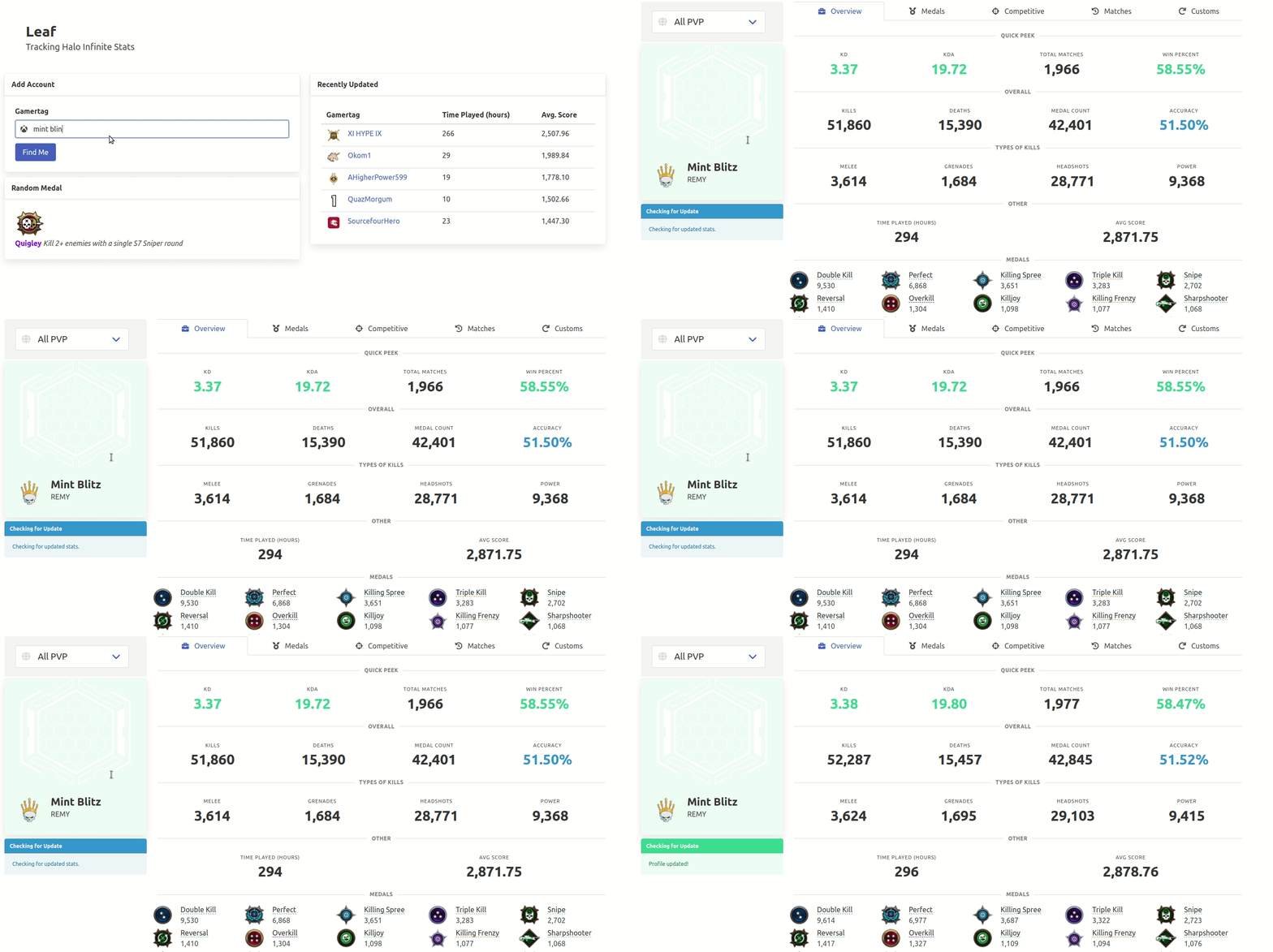
So now I had a pretty slick working site, but refreshing data was the next challenge. I wanted visitors to immediately be able to view information quickly with the power of server side rendering. However, I also wanted to immediately trigger a background update of stats and immediately refresh the screen once that updated information arrived.
![](https://connortumbleson.com/content/images/2022/05/Peek-2022-05-01-09-20.gif)

Livewire "Refresh"

So I built a page setup that is full of Livewire components. It we look at the above animation and associated Blade template - it looks roughly like:

```html
<div class="columns">
  <div class="column">
    <livewire:player-toggle-panel />
    @include('partials.player.player-card')
    <livewire:update-player-panel :player="$player" :type="$type" />
  </div>
  <div class="column is-three-quarters">
    @include('partials.player.navigation')
    @include('partials.player.tabs.' . $type, ['player' => $player])
  </div>
</div>
```

So the sidebar has an interesting component called `update-player-panel` and as the name suggests - it just spawns with some messaging about "*Checking for updated stats*".

This Blade file is quite small and breaks down to just:

```html
<article class="message is-small {{ $color }}" wire:init="processUpdate">
    <div class="message-header">
        <p>Checking for Update</p>
    </div>
    <div class="message-body">
        {{ $message }}
    </div>
</article>
```

It uses `wire:init` which is another cool Livewire feature called [Defer Loading](https://laravel-livewire.com/docs/2.x/defer-loading?ref=connortumbleson.com), so you can call a PHP function after the frontend portion of the component has completed loading.

So once the page loads, I emit an request to run `processUpdate` on the PHP class. This is a simple function that toggles a class variable on the `render` function. This is what Livewire uses to render the component initially and every time it updates.

However, I hit an issue that the component that was detecting updated stats was not the component that was drawing the stats.

Thankfully, Livewire has an "emit" function that allows us to pass messages between components and Livewire even offers a special "$refresh" event that instructs that component to refresh itself.

```php
$this->emitTo(GameHistoryTable::class, '$refresh');
```

We just ask the component to update itself once we know we've updated the underlying data source.

So now the site was working quite well and I was off to get 100% test coverage. So I can test Livewire in both isolation and as a unit.

Take this first example as a more integration level test.

```php
// Tests/Feature/Jobs/GamePageTest.php
public function testLoadingGamePageWithUnpulledGame(): void
{
    // Arrange
    $game = Game::factory()->createOne([
        'was_pulled' => false
    ]);

    // Act
    $response = $this->get('/game/' . $game->uuid);

    // Assert
    $response->assertStatus(Response::HTTP_OK);
    $response->assertSeeLivewire('game-page');
    $response->assertSeeLivewire('update-game-panel');
}
```

At this point I'm just rendering the page to be sure nothing is crashing. The existence of these Livewire components is good enough that the page itself is rendering.

Now I can take those components individually and test them in isolation. Take the Overview page which is the animated image shown above.

```php
public function testValidResponses(array $attributes): void
{
    // Arrange
    $player = Player::factory()
        ->has(ServiceRecord::factory()->state($attributes))
        ->createOne();

    // Act & Assert
    Livewire::test(OverviewPage::class, [
        'player' => $player
    ])
        ->assertViewHas('serviceRecord')
        ->assertSee('Quick Peek')
        ->assertSee('Overall')
        ->assertSee('Types of Kills')
        ->assertSee('Other')
        // ...
        ->assertSee($serviceRecord->kd);
}
```

We can now test that component and all the data it renders out just like we would in Blade testing. This is powerful because my integration tests don't have to worry about the internal workings of each Livewire component and instead each component can be tested in isolation with a variety of inputs to account for all code paths. This ease when coming to testing for both Laravel and Livewire just makes the developer experience great when working with it.

Now [Leaf](https://github.com/iBotPeaches/LeafApp%5FInfinite?ref=connortumbleson.com) is approaching 1000 commits and still has 100% coverage with Laravel Livewire. If I start a new project and the purpose merits it - I'll probably use Livewire again.